
Integrating SAP systems with enterprise applications is crucial for seamless data exchange and streamlined business process automation. MuleSoft’s SAP Connector simplifies this process by enabling seamless communication between SAP and external applications.
Understanding the MuleSoft SAP Connector
MuleSoft’s SAP Connector facilitates interactions with SAP ERP, S/4HANA, and other SAP platforms via BAPI (Business Application Programming Interface), IDoc (Intermediate Document), and RFC (Remote Function Call). It supports both inbound and outbound data exchanges, making real-time and batch processing possible.
Key Capabilities:
- Supports both synchronous and asynchronous communication.
- Compatible with SAP ECC and S/4HANA.
- Leverages SAP-standard integration mechanisms such as BAPI, IDoc, and RFC.
- Implements robust security measures, including authentication and authorization.
- Simplifies SAP integration without requiring in-depth SAP knowledge.
You can learn more about this here.
Benefits of Using SAP Connector in MuleSoft
The SAP Connector is an SAP certified MuleSoft connector that offers multiple advantages for businesses integrating SAP into their IT ecosystem: Simplified Integration
Pre-configured operations reduce the need for extensive coding, enabling faster and more efficient SAP integration.
Scalability and Performance Optimization
Supports high transaction volumes with performance-enhancing features such as connection pooling and caching.
Caching Configurations:
- In-Memory Caching: Use MuleSoft Object Store or caching strategies to store frequently accessed SAP responses, reducing redundant API calls.
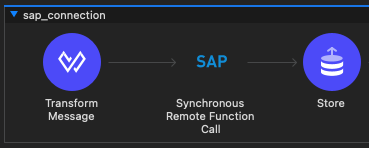
- Cache Scope in MuleSoft: Utilize the Cache Scope in MuleSoft to store SAP response data for repeated requests within a defined period, optimizing API performance.
Security and Compliance
Ensures secure authentication and encrypted data transmission to safeguard sensitive business information.
For enhanced security, SAP supports Secure Network Communications (SNC), which provides end-to-end encryption and secure authentication.
This allows the SAP Configuration to be secured by a certificate to allow secure data communication between systems. You can check the MuleSoft official page here.
Flexibility
If needed, it allows quick and easy updates on the data streams and end-to-end integrations.
Installation and Configuration of the SAP Connector
To implement the SAP Connector in MuleSoft, follow these steps:
Step 1: Prerequisites
Ensure the following before proceeding:
- MuleSoft Anypoint Studio is installed.
- Access to an SAP system with RFC-enabled services is available.
- The SAP Java Connector (JCo) library is set up.
Step 2: Installing the SAP Connector
- Open Anypoint Studio and navigate to Exchange
- Get the connector from Exchange. Search for SAP Connector:
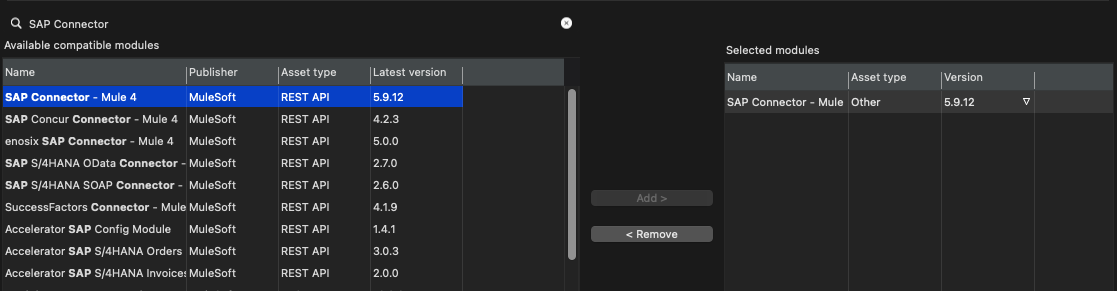
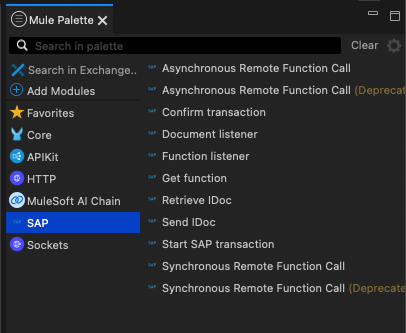
Once imported, the SAP connector will be fully available in the Mule palette:
Step 3: Configuring the SAP Connection
- Open Global Elements and create a new SAP Connector configuration.
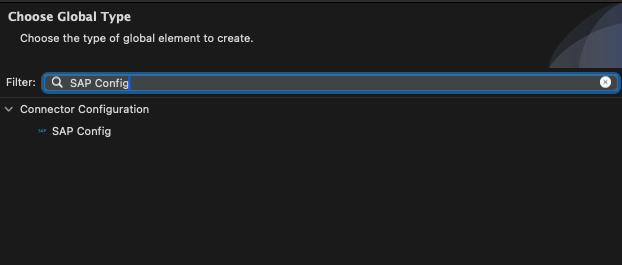
2. Add the necessary JCo Library dependencies.
For establishing the connection, you will be requiring below JCo libraries that you can get it from the SAP marketplace.The first two libraries are meant to be for Multi-Platform purposes. The last JCo Native needs to be specific for Windows, MAC OS or Linux.

3. Enter the required SAP connection details:
- SAP Server Host
- System Number
- Client ID
- User Credentials
4. Validate the configuration by testing the connection.
Step-by-Step Guide: Implementing the SAP Connector in a Mule Flow
Use Case: Retrieving Customer Data from SAP using sRFC
This example illustrates how to create a MuleSoft flow that fetches customer details from an SAP system via a Synchronous Remote Function Call.
Step 1: Building the Mule Flow
- Drag and drop an HTTP Listener to initiate the flow and add the SAP Synchronous RFC component.

2. Configure the SAP connector to invoke the RFC function.
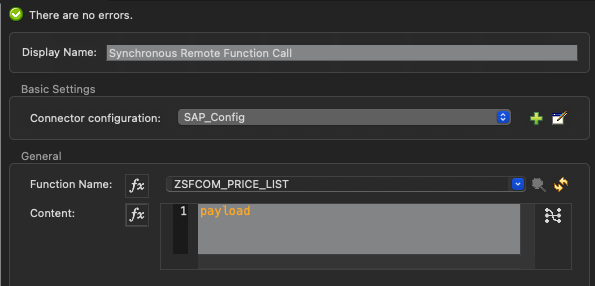
3. Use the Transform Message component to format the response into JSON.You can use Dataweave for map the fields between SAP Response and your defined Data Model.

4. Deploy and test the integration.
Step 2: Testing the Integration
- Send an HTTP request to the MuleSoft endpoint.
- The SAP Connector retrieves customer details from SAP.
- The response is returned in JSON format.
Best Practices for SAP Integration with MuleSoft
- Leverage Connection Pooling: Optimize performance by managing SAP connections efficiently
- Implement Robust Error Handling: Use Try-Catch blocks to gracefully handle SAP-specific error
- Secure Credentials: Store sensitive SAP authentication details securely using properties files and secure environment variables
- Optimize Data Mapping: Use DataWeave to transform and process data between SAP and MuleSoft efficiently. You can learn more about Dataweave here.
Conclusion
MuleSoft’s SAP Connector is a powerful tool for integrating SAP systems with enterprise applications. Its flexibility, security, and ease of use enable organisations to streamline SAP connectivity, enhance operational efficiency, and support digital transformation initiatives. By applying best practices, businesses can ensure seamless, scalable, and secure integration with SAP. Learn how we can help you in your journey here.

André Santos is an Integration Developer at Stellaxius with over 10 years of experience in this area, with focus in development, process optimization and API building and architecture.