

Every Agentforce demo makes it look effortless!
Stand up an agent, point it at your org, give it a topic and a few actions, and watch it qualify leads, update records, and nudge deals forward while your reps focus on selling.
But then the agent goes live, and within days it’s working the wrong Contact off a duplicate Account, closing Tasks that were never actually finished, or confidently reporting a pipeline number your RevOps team doesn’t recognise.
Why? Well, the agent isn’t the problem.
Agentforce reasons over whatever your org gives it, such as records, fields, automation, permissions, all of it.
If those foundations are inconsistent, an agent doesn’t quietly work around the mess the way a seasoned rep would. It executes against it, at whatever scale you’ve given it access to.
That’s why the work of an Agentforce rollout starts before the agent ever goes live. In our experience at Stellaxius, it comes down to three checkpoints worth running through in every org: data quality, process, and ownership.
Checkpoint 1: Data Quality
Can the Agent Trust What’s in Your Org?
An agent makes decisions based on whatever it can query.
If your Accounts are duplicated, your Opportunity stages are stale, or your fields are populated only when a rep remembers to, the agent will act on that data exactly as confidently as it would act on clean data.
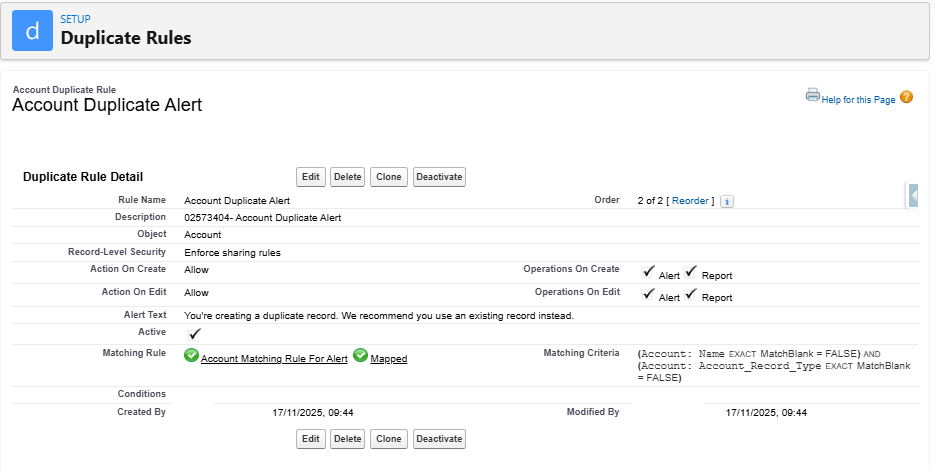
Figure 1 – Example of a validation rule
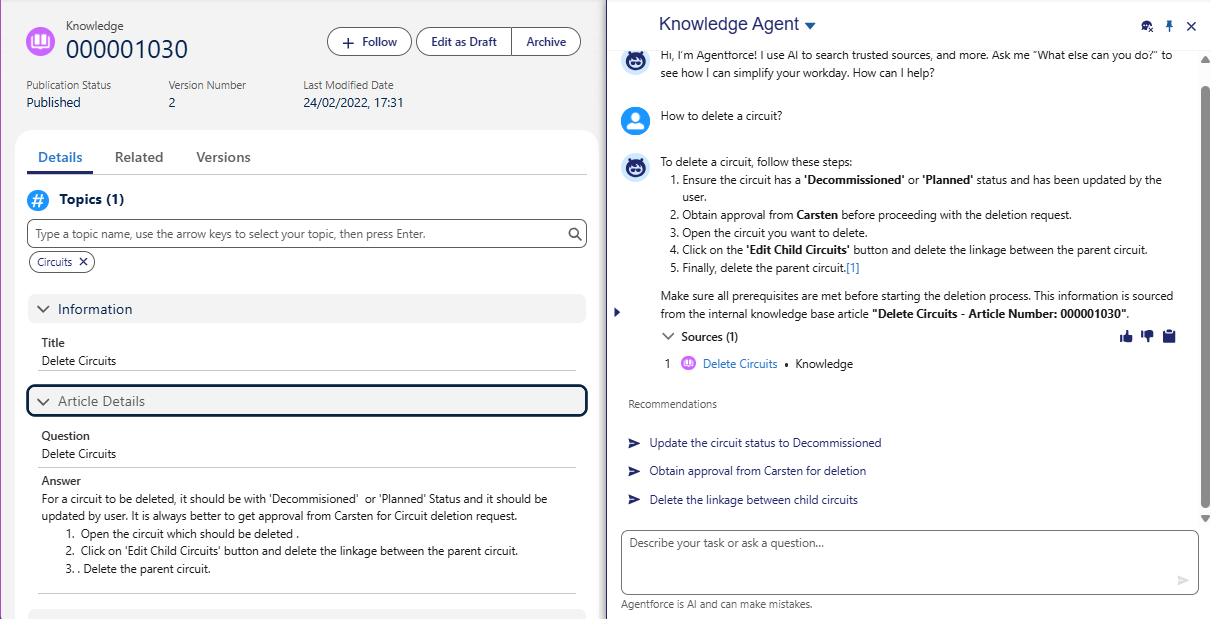
Figure 2 – Example of an outdated article (Data 360) and the good but bad response of the Knowledge Agent
In the example above, the User Carsten is no longer at the company. Because of this, the article isn’t updated, and the agent’s response won’t be correct.
Run through this before go-live:
- Are your Duplicate and Matching Rules catching Account and Contact duplicates, or have they been quietly ignored since the last data import?
- Do critical fields (Stage, Close Date, Next Step)get populated consistently across teams, or does completeness depend on which rep is working the record? Validation Rules and Required fields can enforce this, but only if they’re built against how the business sells, not how it sold three reorgs ago.
- If you’re layering Data 360 (formerly Data Cloud) under the agent for a unified customer profile, has that harmonisation run, or is it still ingesting conflicting records from your marketing platform and a handful of spreadsheets nobody wants to admit to?
A rep who works around a messy Account record loses a few minutes. An agent that works around it can send outreach to the wrong Contact, misroute a Case, or misreport a forecast, at whatever volume the automation is scoped to run.
Checkpoint 2: Process
Is There Actually a Process to Automate?
Agentforce executes whatever logic you give it (Flows, Prompt Builder instructions, Apex actions) consistently, every single time.
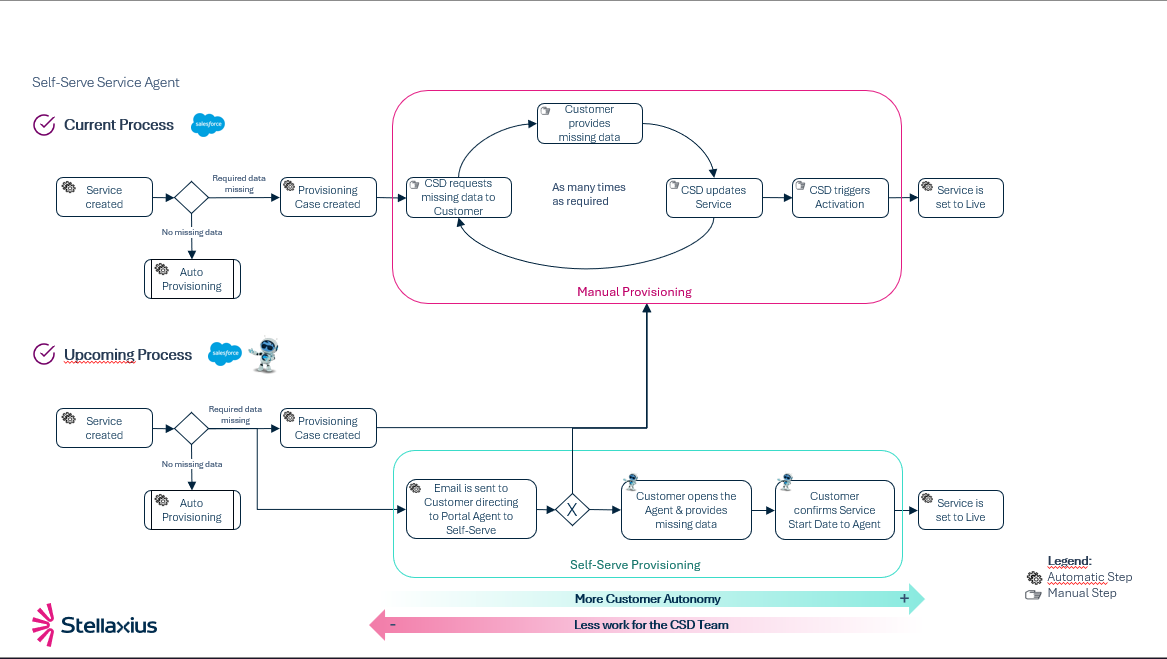
Figure 3 – Example of a process to Automate after the analysis of the process and its pain points
That consistency is the entire value proposition… But it’s also the risk.
If your real qualification or escalation process lives in your top rep’s head rather than in a documented Path or Flow, there’s nothing solid for the agent to learn from.
Before deployment, map the process you want automated, step by step, and be honest about where judgement calls happen today. Some of those calls, such a lead score threshold, a discount approval limit, a case priority rule, can be codified cleanly into Flow criteria or Apex logic.
Others genuinely need a human, and an AI-ready process draws that line explicitly rather than leaving the agent to guess.
This is also where we consistently find that “the process” is several processes – one per region, one per business unit, one per rep who’s built their own shadow workflow over the years, whether Sales Cloud and Service Cloud agree on how a record should move.
An agent deployed on top of that inconsistency won’t unify it. It will faithfully automate the chaos, just faster than any human could.
Checkpoint 3: Ownership
Who’s Accountable When the Agent Gets It Wrong?
This is one of the steps that causes the most damage when it surfaces.
An agent will, eventually, get something wrong, like send a message it shouldn’t have, update a field incorrectly, or act on a recommendation built on incomplete context.
The question isn’t whether that happens but if your org is set up to catch it before it compounds.
Clear ownership in Salesforce terms means defining, before go-live:
- Which profiles, permission sets, and sharing rules govern what the agent can see and touch and whether that scope matches what it should be doing.
- What triggers human review versus autonomous action, and how that’s enforced through Einstein Trust Layer guardrails, grounding, and topic/action-level permissions in Agent Builder.
- Who owns the underlying data quality going forward, not just at launch, but as an ongoing operating rhythm.
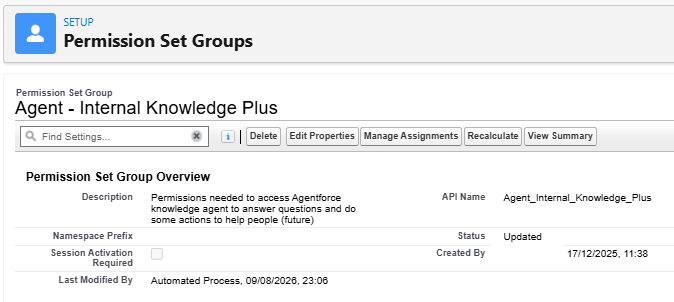
Figure 4 – Example of a permission set group to access a specific agent
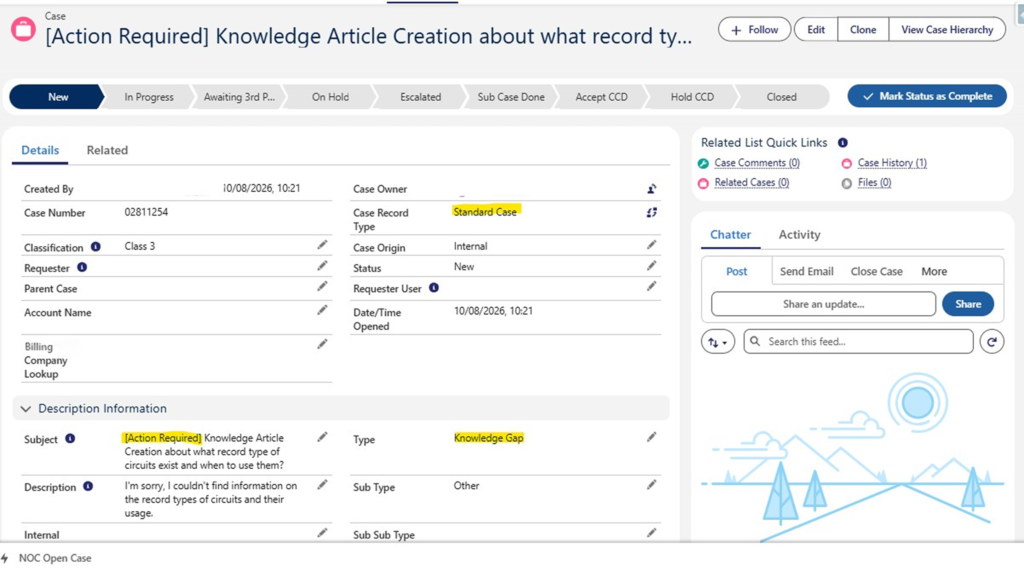
Figure 5 – Feedback Loop Feature
IT Internal Team can see when the agent is unable to respond to a knowledge question, for example.
Without this, accountability tends to default to “whoever notices first”, usually a rep or a customer, well after the fact. Orgs that get this right treat agent oversight the way they’d treat onboarding a new hire: scoped access, a defined escalation path, and a review cadence that tightens or loosens as trust is earned. We wrote more about where these gaps tend to show up in Opportunities and Challenges with the Rise of Agentforce Agents, if you want the fuller picture.
Fix the Foundation Before You Add the Agent
The orgs getting real value from agents today are, almost without exception, the ones that treated data cleanup, process definition, and ownership as the actual project, with the agent as the final step, not the first one.
Let’s say you handed a new hire your current org with no tribal knowledge and told them to work it exactly as documented in your Flows and Validation Rules, would they succeed? If the honest answer involves a lot of “well, actually, you’d need to know that…”, then that’s the gap an agent will fall straight into.
Closing those gaps requires an honest audit of where the data, process, and ownership issues sit in your instance, and a prioritised roadmap to fix the ones that matter most before automation touches them.
That’s exactly where our AI Advisory & Enablement practice comes in, built around the same three checkpoints this article walks through:
- AI Readiness Assessment – an honest, org-level diagnostic of your data quality, process maturity, and ownership model, so you know exactly what’s blocking a reliable Agentforce deployment before you build anything.
- AI Strategy & Roadmap Development – a prioritised, sequenced plan that closes the gaps the assessment uncovers, so effort goes where it moves the needle first.
- Strategic Agentforce Transformation – hands-on delivery to design, govern, and roll out agents on a foundation that’s ready for them.
Ready to see where your org stands before you deploy an agent? Contact us and we’ll walk you through what an AI Readiness Assessment looks like for your Salesforce instance.

Ricardo is a dedicated Business Analyst committed to achieving excellence in every project he undertakes. He completed the Stellaxius Academy, where he received extensive training in Salesforce, Business Analysis, and the full software development lifecycle.