
Most organisations running Salesforce Field Service are only using a fraction of what the platform can do.
Between the Salesforce Winter ’26 and Spring ’26 Release Notes, Salesforce shipped a genuinely strong batch of updates, several of which land directly on the technician’s day, the dispatcher’s workload, and the cost of running the operation.
Here are the seven worth prioritising, ranked by the impact we’re seeing with clients.
1. Voice to Form
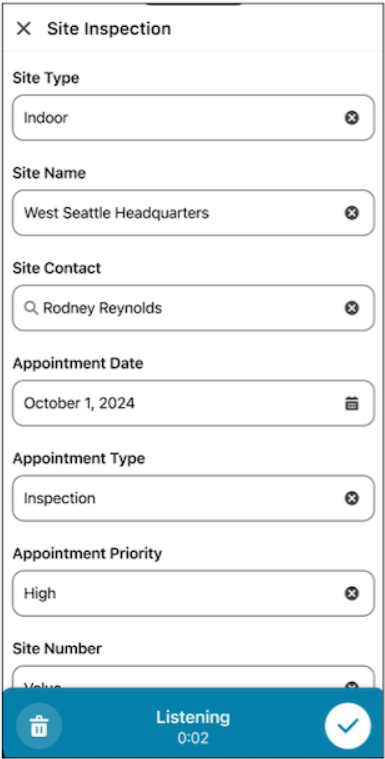
Technicians tap the microphone, speak a summary of their work, and the system populates the correct fields automatically, hands-free, gloves on, even offline.
This isn’t dictation into a notes field. Voice to Form is AI-powered: it intelligently maps spoken input to structured Data Capture form fields, in whatever order the technician says them, cutting documentation time and the risk of incomplete records.
Voice to Form runs on top of the Data Capture framework, so it needs Data Capture configured first. It’s available on Enterprise, Performance, and Unlimited editions. If you’re already using Data Capture forms, this is one of the highest-impact, lowest-lift additions on the list.
2. Native GIS Mapping
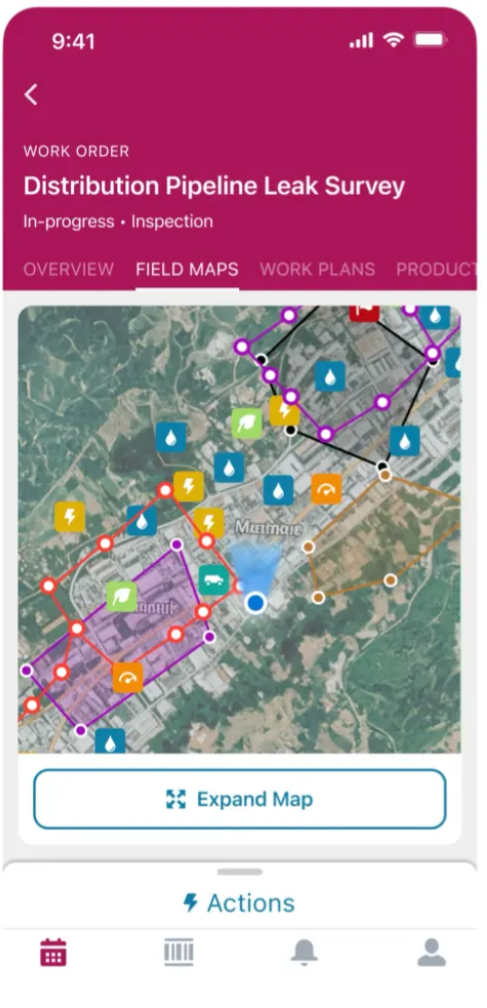
Technicians can now view, interact with, and update complex geospatial data, including assets, lines, and polygons, directly within the Field Service mobile app, without switching apps. The Native GIS Mapping layer is scoped to the technician’s work location, and critically, it works offline, which is relevant for jobs underground, remote, or in signal-poor environments.
For organisations managing distributed infrastructure, fibre networks, power grids, water systems, this is one of the most impactful additions Salesforce has made to the mobile experience in recent memory. It’s available on Performance and Unlimited editions only, which makes it a strong argument for clients on Enterprise to evaluate an edition upgrade this year.
3. Dynamic Scaling in Optimisation
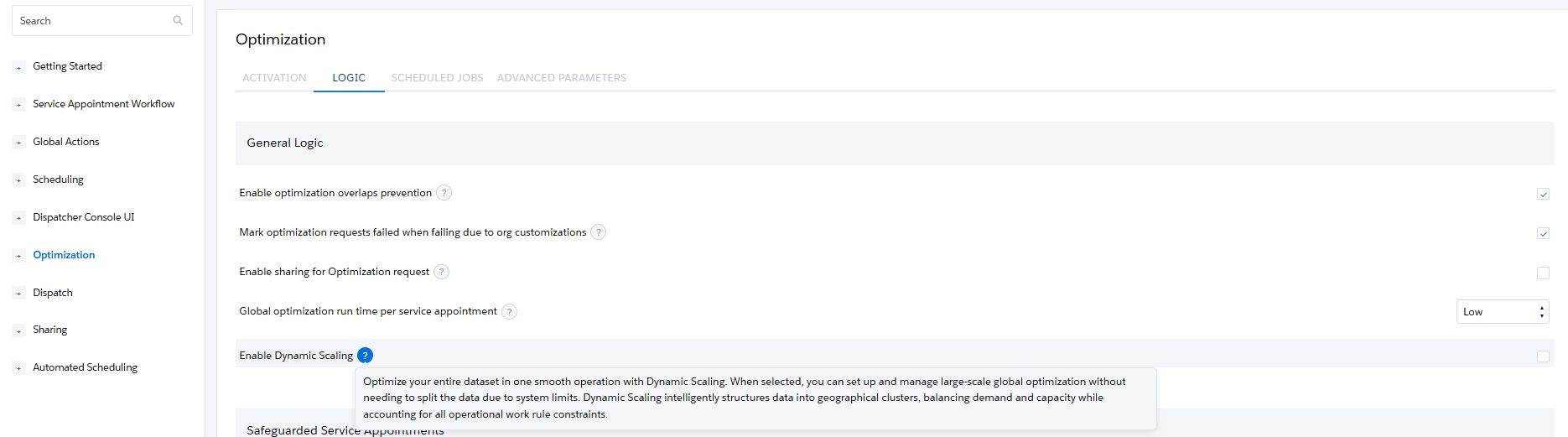
Previously, optimising across multiple service territories meant defining boundaries manually and managing parallel runs. Dynamic Scaling removes that step entirely: select all territories in a single scheduled optimisation job, and the system handles the rest.
For large operations, this is a direct reduction in planning overhead and scheduling errors. If your organisation is running Enhanced Scheduling and Optimisation across multiple territories, it’s worth revisiting your optimisation job configuration; the gains are immediate and require minimal effort to unlock.
Combine Dynamic Scaling with Agentforce and the payoff compounds: AI agents now explore over one consistent, global dataset instead of stitching together territory-by-territory runs, which means faster anomaly detection and dispatch recommendations that reflect the whole operation. For more on where Salesforce is heading with this: Anchoring the Agentforce Era in Field Service Optimisation.
Four Quick Wins
These four require less implementation effort than the big three above, but they add up fast in day-to-day usability.
4. Multiple Image Preview in Data Capture
Technicians can now view multiple images associated with a record directly inside the Data Capture form, including images from previous jobs, and add new ones after the form is created. Previously, only a single image uploaded at form creation was visible. A small change with a real impact on first-time fix rates.

5. Data Capture Lookup Component
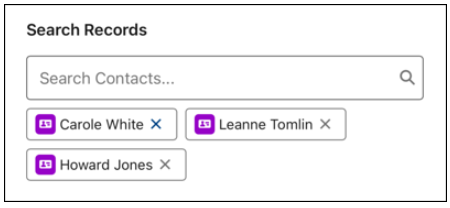
Lets mobile workers search for and select related records directly within forms and flows. Technicians can look up Contacts, Assets, or Products and instantly populate related fields, even while working offline.
6. Rule Violation Analytics (Beta)
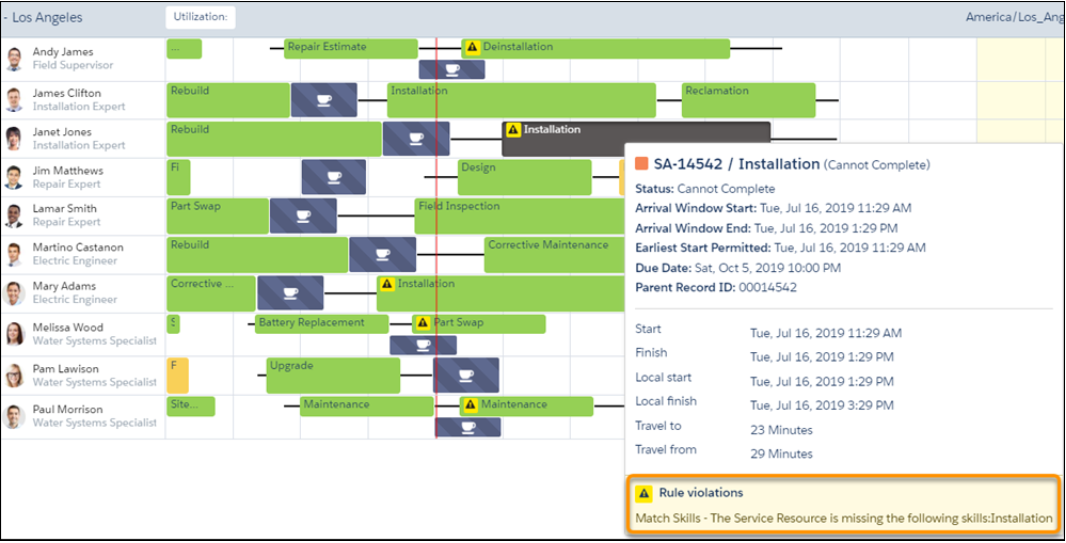
Built on the Enhanced Scheduling and Optimisation data model, this feature captures every rule manually violated on the Gantt and surfaces the underlying causes: skill gaps, geographic imbalances, capacity mismatches, and ingests the outcome into Data 360. You can then view rule violation information from your Data Model Objects (DMOs) in Data 360 and use Tableau Next to analyse your data and find useful and actionable insights that can drive business success.
7. Visual Remote Assistant
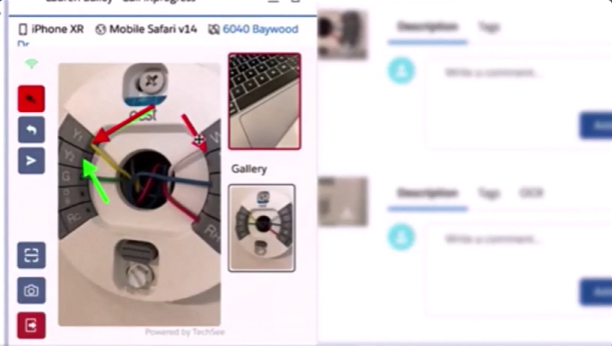
Production-ready, with several meaningful updates this cycle: technicians can choose which screen to share during a session, multiple session images can be retrieved and stored in bulk, and a new Access Validation tab makes permission troubleshooting far more straightforward.
Don’t Leave These Features Sitting Unused in Your Org
Reading about a feature and having it working for your technicians are two different things. Most of what’s on this list requires the right edition, the right licences, and a configuration decision made deliberately, not left to whatever’s still set up from your last implementation.
That’s exactly what our team does: assess your current Field Service configuration against what’s available in your edition, prioritise which of these seven will move the needle first for your operation, and implement them properly.
Not sure which of these seven your org is ready for? Contact us, and we’ll walk through your current Field Service setup together, what’s configured, what’s missing, and what should be next on your roadmap.

I'm a Salesforce Consultant with a background in Quality Control and Process Engineering. I hold a degree in Chemical Engineering, with a focus on Process, Environment, and Energy sectors, which has given me a strong analytical mindset and a structured approach to problem-solving.
Dedicated, adaptable, and goal-oriented, I enjoy taking on new challenges and continuously developing my skills to deliver impactful results and contribute to team success.